Keyboard Setup › Korg
Korg M3
Korg M3 (all versions)
The M3 is tuned with polyphonic aftertouch: the app sends it per note, and each Program must route Poly After to oscillator pitch at −50 cents.
- 1Select the Program to prepare
Pick a Program you want to use with the app. You must repeat steps 2–5 for every Program you want to retune.
- 2Open OSC Pitch
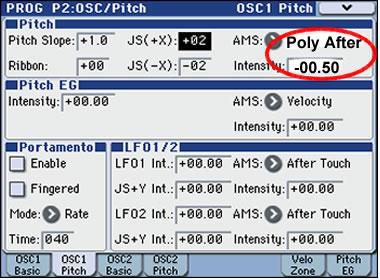
Press PAGE SELECT, choose P2: OSC Pitch, then OSC1 Pitch (and later OSC2 Pitch).
- 3Route Poly After to pitch
Set AMS to Poly After and Intensity to −00.50 (that is −50 cents). If the Program uses two oscillators, set both OSC1 and OSC2 the same way.
- 4Write the Program
Save with Write (down arrow, top-right corner).
- 5Global MIDI basics
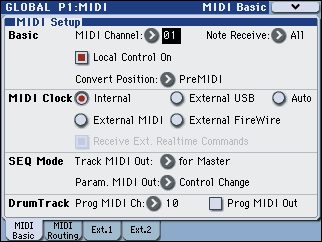
Go to GLOBAL → P1: MIDI. Set MIDI Channel to 01 and Convert Position to PreMIDI. Turn Local Control off on the keyboard (the app has its own Local Control switch).
- 6MIDI Routing filters
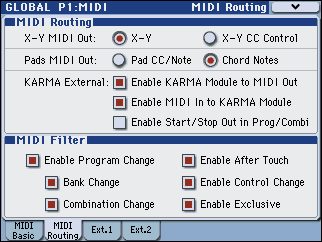
Open the MIDI Routing tab and make sure all MIDI filter boxes are enabled (Program Change, Bank Change, Combination Change, After Touch, Control Change, Exclusive).
- 7Write Global Settings
Open the page menu, choose Write Global Setting and confirm with OK.

Notes
- Choose "Korg M3" in the app's keyboard list. The app's MIDI channel for the M3 must match the channel set in Global.
Need help? Contact us.